


-202610121017596081271.jpg)




Download
iLearn application
Elevate Your Financial Knowledge with the
ICICI Direct iLearn App




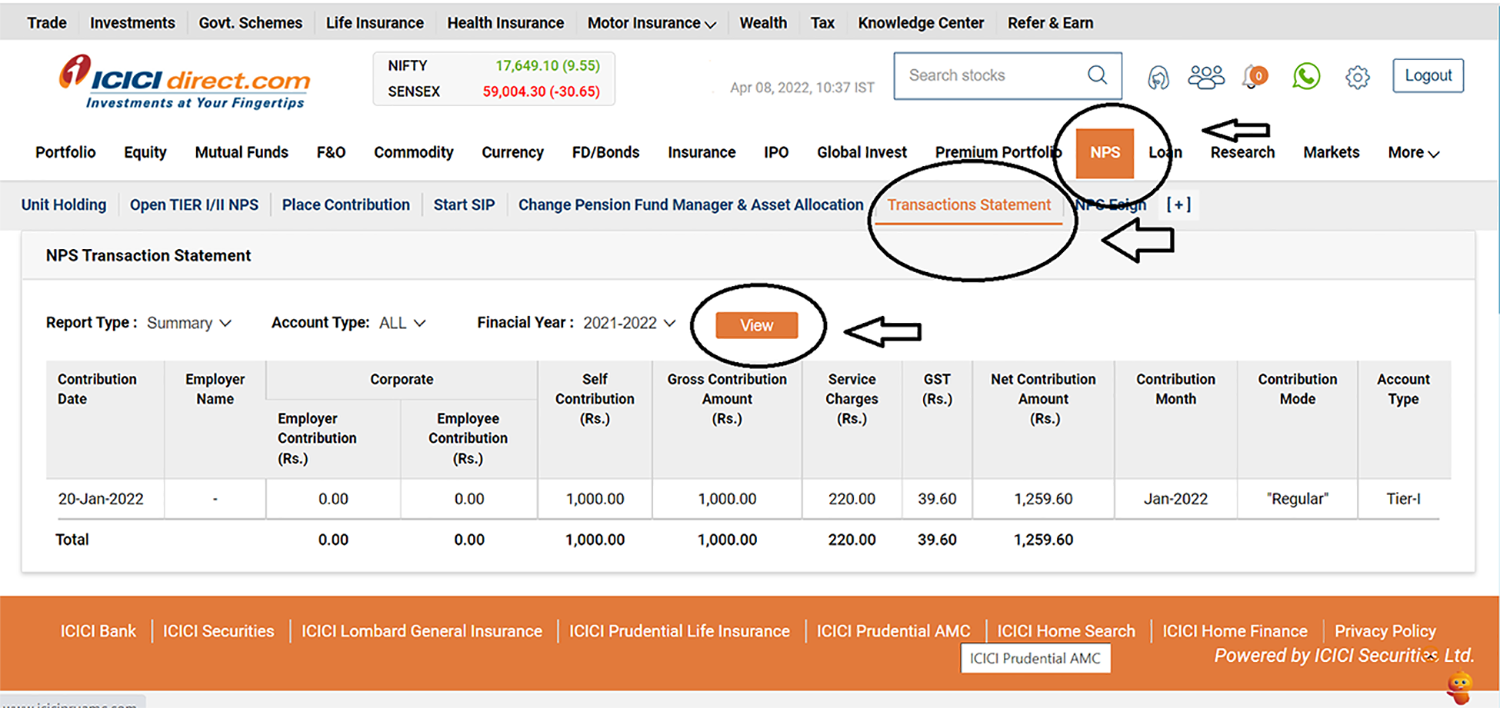
At ICICI Direct we believe in providing our customers a seamless experience for not only doing a transaction but also post transaction requirements like getting transaction statements.
We understand that you may need transaction statements either for the purpose of submitting these towards investment proof or may be for any other purpose. NPS contribution statements can be downloaded in below 4 easy steps:
Provide the Login ID and password. Also, provide your date of birth or your permanent account number.
Select ‘Year’ and click on ‘View’.
Through ICICI Direct investment app, you can seamlessly transact, track investment performance, get statements, etc. So, now you can now easily plan for your future and your retirement goals.


Copper is a widely used base metal known for its electrical and thermal conductivity, strength, ductility and corrosion resistance. It is used across electrical wiring, construction, machinery, power infrastructure and several industrial applications.
 224 views
 2 minutes
 09 Oct 2026
Natural Gas is a widely traded energy commodity used for electricity generation, industrial activity, heating and other applications. Its prices can react sharply to weather, supply and demand, inventories, global energy markets and geopolitical developments.
399 views
1 minutes
30 Sep 2026
Gold is more than a precious metal. It is a safe-haven asset, investment avenue, central-bank reserve asset and industrial commodity. For a commodity trader, understanding both Gold's fundamentals and the contract being traded is important.
537 views
3 minutes
23 Sep 2026

Elevate Your Financial Knowledge with the
ICICI Direct iLearn App
Elevate Your Financial Knowledge with the
ICICI Direct iLearn App
