







Download
iLearn application
Elevate Your Financial Knowledge with the
ICICI Direct iLearn App




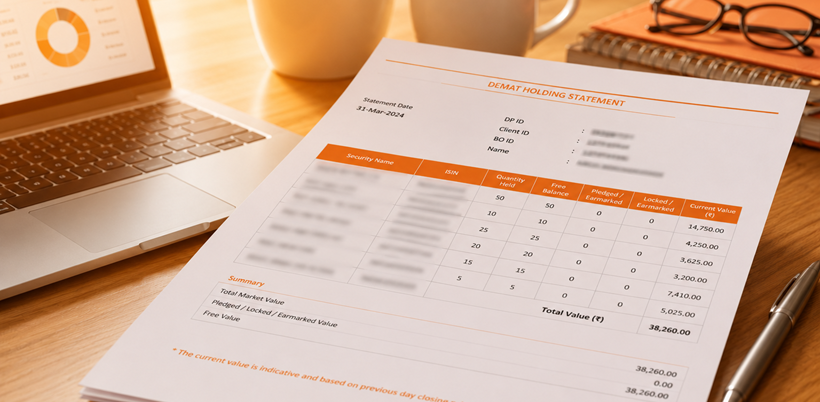
A demat account statement is one of the most useful records for an investor. It shows the securities held in your demat account, such as shares, ETFs, bonds, government securities and other eligible investments in electronic form.
Many investors check only the portfolio view on their trading app. That view is helpful for daily tracking, but a demat holding statement gives a more formal record of securities held in the demat account. It can help you verify ownership, review your portfolio, check pledged or locked balances and maintain records for tax or loan-related work.
You can access this statement through different routes, such as your broker or Depository Participant, NSDL, CDSL or a Consolidated Account Statement. The right route depends on whether you want details from one demat account or a combined view across demat accounts and mutual fund folios.
This guide explains how to download a demat holding statement, how to read the key fields and how investors can use it to keep their records organised.
A demat holding statement is a record of securities held in your demat account on a selected date.
It works like a snapshot of your investments. It does not show the cash balance in your bank or trading account. Instead, it shows securities held in electronic form, such as equity shares, ETFs, bonds, government securities, mutual fund units held in demat mode and other eligible holdings.
If you want to know what you currently hold in your demat account, you should check the demat holding statement.
A demat holding statement usually includes account and security-level details. These fields help you identify the account, the securities held and the status of each holding.
Common details include:
A demat holding statement is useful beyond routine portfolio checking. It helps you maintain a reliable record of what you own.
You may use it to:
You can download or view a demat holding statement through different routes. Each route has a different purpose.
You can download your demat holding statement from the broker or DP website by following these steps:
Visit the official website or open the mobile app of your broker or DP. Log in using your registered credentials, PIN, biometric access or OTP, as applicable.
After logging in, navigate to the section related to portfolio, holdings, demat account, reports or statements. The exact name may vary across platforms.
Choose the option to view or download your demat holding statement. Some platforms may also provide related reports, such as transaction statements or dividend statements, in the same section.
Select the time period for which you want to view or download the statement.
Click or tap the download option to save the statement on your device. The statement can be used for portfolio review, ownership verification, tax-related records or other documentation needs.
Since a demat holding statement contains sensitive investment and account details, store the downloaded file securely and avoid sharing it through unverified channels.
If your demat account is held with NSDL, you may be able to access statements through NSDL investor facilities, depending on registration and available services.
You can usually follow these steps:
If you are not sure whether your account is with NSDL, check the demat account number format. NSDL demat accounts generally begin with “IN”, followed by numbers.
If your demat account is held with CDSL, you can use CDSL Easi or MyEasi to access demat-related information.
CDSL Easi allows registered Beneficial Owners to view holdings and transactions online. It also allows viewing and printing of holdings and valuation based on the previous day’s closing price, where available.
You can usually follow these steps:
CAS stands for Consolidated Account Statement. It gives a combined view of securities market investments linked to your PAN and available account records.
A CAS can include transactions and holdings across demat accounts held with CDSL and NSDL. It may also include mutual fund units held in Statement of Account (SOA) mode with Mutual Fund RTAs.
CAS is useful when you want one combined view instead of checking each account separately.
A demat holding statement usually shows holdings in one demat account. CAS gives a broader view.
|
Basis |
Demat Holding Statement |
CAS |
|
Scope |
One demat account |
Consolidated view across demat accounts and eligible mutual fund folios |
|
Issued through |
Broker, DP or depository facility |
Depository or AMC/MF RTA, depending on investor records |
|
Best used for |
Account-level holding check |
Consolidated review across accounts |
|
Includes mutual funds |
Only if held in demat form |
May include mutual fund units held in Statement of Account (SOA) mode |
CAS is generally sent monthly if there is a transaction in any demat account or an eligible mutual fund folio during the month. If there is no transaction, a half-yearly CAS with holding details is generally sent for March-end and September-end holdings.
If an investor has demat accounts across both depositories, the depository linked to the earlier opened demat account generally acts as the default depository for dispatching CAS.
If the investor does not have a demat account and only holds mutual fund units in statement-of-account form, the CAS may be sent by AMCs or Mutual Fund RTAs.
This is why CAS can be useful for investors who want to review inactive or forgotten demat accounts. It can help you identify holdings that may not appear in the trading app you currently use.
CAS is useful when you:
Investors who have changed brokers over the years may find CAS especially useful because old holdings can sometimes remain in earlier accounts.
A demat holding statement becomes easier to read once you know which fields matter. Start with the account details, then move to the security details and balance status.
The security name tells you what you hold. The ISIN confirms the exact identity of that security.
This is useful when checking ETFs, bonds, preference shares or securities with similar names. If there is any doubt, use the ISIN to verify the instrument.
Quantity shows the number of units you hold. For equity shares, it shows the number of shares. For ETFs, bonds or other instruments, it shows the number of units or securities held.
If the quantity looks different from what you expected, check the transaction statement, settlement status and any corporate actions such as bonus issue or stock split.
Free balance usually refers to securities that are available without restriction in the demat account.
These are the securities you can generally sell or transfer, provided there is no other block, settlement requirement or account-level restriction.
Pledged securities are marked as collateral. Investors may pledge securities for margin requirements or loans against securities, depending on provider rules.
If a security is pledged, it may not be freely available until the pledge is released.
Locked securities cannot be sold or transferred until the lock-in period ends. Lock-in may apply due to regulatory rules, issue terms, employee stock plans or other specified conditions.
Earmarked securities are securities that are blocked or set aside for a specific purpose. This may happen for settlement, delivery obligation, lien, pledge-related processing or another approved transaction process.
If securities are earmarked, they may still appear in your demat account, but they may not be freely available until the earmark is released.
The valuation shown in the statement is generally linked to prevailing market prices and may change with market movements.
If the market price rises, the value shown for the same quantity may increase. If the market price falls, the value may decrease. The quantity does not change unless there is a transaction, transfer, pledge, release or corporate action.
These details identify your demat account. DP ID refers to the Depository Participant. Client ID or BO ID identifies the investor account.
You may need these details when downloading statements, raising service requests, transferring securities or checking account records.
Your demat holding statement can support tax-related review, but it may not be enough on its own for income tax filing.
The statement helps you check what securities were held on a selected date. For tax calculations, you may also need:
A demat holding statement contains sensitive account and investment details. Handle it carefully to protect your information and manage your investments better.
Download statements only from official broker, DP, NSDL or CDSL platforms. Avoid opening unknown links received through SMS, email or messaging apps.
Never share OTPs, passwords, PINs or login credentials with anyone. A genuine platform will not ask you to share your password or OTP with a person over a call or message.
If you need to share the statement for loan processing, tax review or documentation, hide details that are not required. This may include partial account details, contact information or other sensitive identifiers, depending on the purpose.
Save statements in a secure folder. If the file is password-protected, do not store the password in the same place. Delete unnecessary copies from shared or public devices.
Download and review your demat holding statement every few months. This helps you stay updated on your holdings and spot unexpected changes early.
Compare your demat statement with your trading app portfolio, contract notes and transaction reports. This is useful after large trades, transfers, pledges or corporate actions.
Your mobile number, email ID, address and bank details should remain updated with your broker or DP. This helps you receive OTPs, alerts, statements and important account communication without delays.
Nomination is an important part of investment record management. If your family details or preferences change, review the nomination details in your demat account and update them as per the applicable process.
Before placing a sell order, check whether the securities are available in free balance. If holdings are pledged, locked or earmarked, they may not be available for sale until the relevant process is completed.
A demat account statement helps investors understand what they hold, where it is held and whether any securities are pledged, locked, earmarked or otherwise not freely available.
You can download the statement through your broker or DP, NSDL, CDSL Easi or MyEasi, or use CAS for a consolidated view. Reviewing it regularly can make portfolio tracking, ownership verification, tax-related preparation and account monitoring easier.
For investors, the statement is more than a record. It is a useful tool for keeping investment information clear, updated and easier to act on.
A demat holding statement is a record of securities held in your demat account on a selected date. It may include shares, ETFs, bonds, government securities and other eligible securities held in electronic form.
Yes, you can download it online through your broker or DP platform, NSDL, CDSL Easi or MyEasi, or access a consolidated view through CAS, depending on your account and registration status.
No, a demat holding statement usually shows securities held in one demat account. CAS gives a consolidated view of demat accounts and eligible mutual fund folios linked to your PAN and available records.
Check your demat account number. NSDL accounts generally begin with “IN”, while CDSL accounts usually have a 16-digit numeric BO ID.
Yes, a demat holding statement can be used as proof of securities held in your demat account. Acceptance may depend on the organisation requesting the proof and the purpose for which it is required.
In many cases, yes. Broker, DP and depository platforms may allow you to select previous dates or periods, depending on statement availability and platform rules.
Check the statement date, account number, settlement status and transaction history first. If the mismatch remains, contact your broker or Depository Participant.
The update frequency depends on the platform and statement type. Broker apps may show holdings after settlement, while formal statements depend on the date or period selected.


Natural Gas is a widely traded energy commodity used for electricity generation, industrial activity, heating and other applications. Its prices can react sharply to weather, supply and demand, inventories, global energy markets and geopolitical developments.
 231 views
 1 minutes
 30 Sep 2026
Gold is more than a precious metal. It is a safe-haven asset, investment avenue, central-bank reserve asset and industrial commodity. For a commodity trader, understanding both Gold's fundamentals and the contract being traded is important.
373 views
3 minutes
23 Sep 2026
Gold is one of the world's most actively traded precious metals and is widely used for investment, jewellery and industrial applications. It is also considered a safe-haven asset during periods of economic or market uncertainty.
733 views
3 minutes
07 Sep 2026

Elevate Your Financial Knowledge with the
ICICI Direct iLearn App
Elevate Your Financial Knowledge with the
ICICI Direct iLearn App
